Overview
In our internet connected world, information is the currency that keeps everything moving. Unfortunately there is no easy way to authenticate most of the information that people furnish over the internet. Basic information such as someone's name, age or address cannot be easily authenticated without having an expensive back office operation in place.
Solution
In this document we describe a protocol and API implementation that provides a secure,scalable and inexpensive way to authenticate information on the internet. The API can be used to verify someone's personal information such as name,age or authenticate information such as academic transcript, or for that matter any digital information for which verification is required.
Information Trust Relay
The approach described is predicated on a simple observation; which is that while we cannot readily trust the information someone furnishes to us, there are usually other entities (business or otherwise) who have verified that information and as such have established trust for it. What if that established trust can be leveraged by everyone else who's ever presented that information? This observation forms the basis for the protocol and API solution described herein.
Information Trust Relay Protocol & API
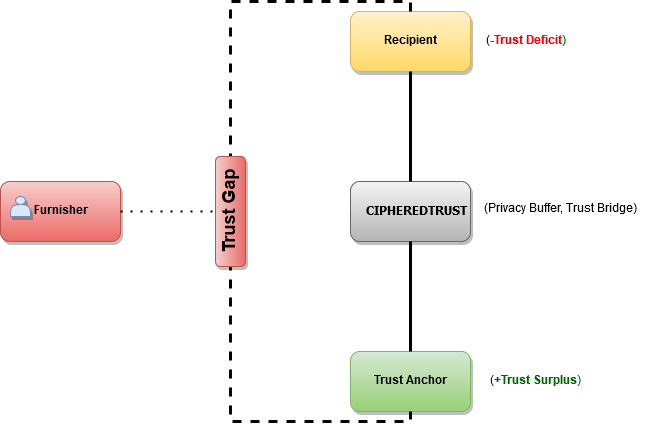
At the core of this solution is a Trust Relay Protocol. This protocol uses modern cryptography and end-to-end encryption to guarantee that trusted information can be relayed in a manner that is secure, private and untampered with. The Trust Relay Protocol is modelled after the widely used internet Transport Layer Security (TLS) protocol, thus inheriting both the security and privacy features of TLS. Below is a diagram and detail description of the relevant components:
-
Furnisher
The person/party who presents untrusted information. For instance a customer who presents a credit card number or student who comes in to admission with an academic transcript. In the language of federated identity brokerage, the furnisher is the principal.
-
Recipient
The person/party who is presented with untrusted information by Furnisher. For instance an e-commerce site who receives a credit card number or a college who receives an academic transcript from a student. In the language of federated identity brokerage, the Recipient is the relying party or service provider.
-
Trust Anchor
The party who can relay established trust for information presented by furnisher to a recipient. Trust anchors make our solution possible. A trust anchor is a party that the furnisher does business with. The range of entities that can serve as trust anchors is extensive, this can be a bank, an insurance company, an employer, a hospital, a university...etc. In the language of federated identity brokerage, the Trust Anchor is the attribute provider.
-
Cipheredtrust
-
Privacy Buffer
A privacy buffer protects the privacy of the Furnisher while facilitating information exchange between the Recipient and the Trust Anchor. It may at first seem odd to consider privacy as a potential concern given that the Furnisher is volunteering information and willingly engaging these parties.
Consider a scenario where the furnisher is using a healthcare provider to verify some bit of information. Maybe the information the furnisher wants to present is blood type, that by itself is innocous enough, now suppose the healthcare provider is a cancer treatment center or an HIV treatment center, it is likely that while the Furnisher wishes to share their blood type information, it does not follow that they wish to reveal other information about their health
Consider a second scenario where the Furnisher uses their employer to verify their age. Maybe the Recipient is a medical (or recreational) marijuana dealer, it is likely the Furnisher does not wish to reveal that information to their employer regardless of the reason they're buying marijuana.
With these two simple scenarios we can see that there is grounds for a Furnisher to want a buffer between the Recipient and Trust Anchor even while they wish to share information between the two parties.
-
Trust Bridge
As the diagram illustrates above, there exists a Trust gap between the Furnisher, Receipient and Trust Anchor, our role is to bridge this gap. Our implementation of the relay protocol via our API is the manifestation of this bridge.
We can see that there is a trust surplus on the side of the trust anchor and there is a trust deficit on the side of the recipient, we brige this divide.
-
How the protocol works
Below is an outline of the information trust relay protocol and the important steps involved:
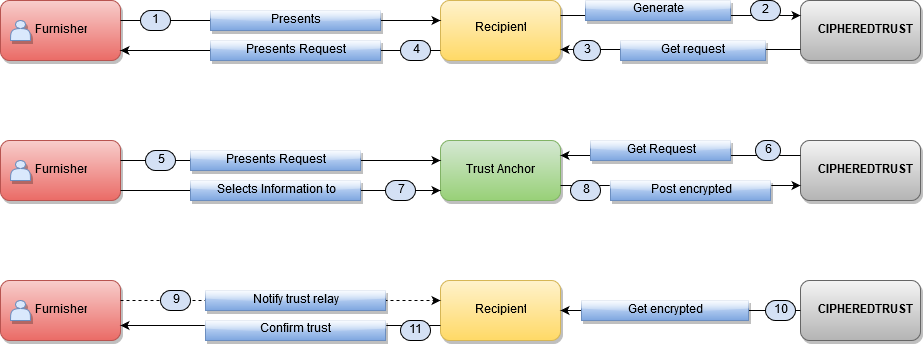
What follows is a precise description of the information trust relay protocol. Each step corresponds to a step in the diagram above. An assumption here is that the furnisher has an account with an existing trust anchor.
- A furnisher presents information to recipient. This can take many forms, maybe during signing up for a service the furnisher puts in their name or enters a credit card where the recipient is the service provider (ex. social app, e-commerce app).
-
The recipient generates a request object via the
POST/requestsAPI call. - The API generates the request object and returns it to recipient. At this point the recipient would probably want to store elements of this request for further application flow processing.
- At this point the recipient would hand the token code to the furnisher of the information. This is also the point where recipient may need to educate furnisher about how to use the token, ie what are they expected to do with it.
- The furnisher logs into an account they have with a trust anchor, this could be their bank, insurance company ,university, healthcare provider...etc. Furnisher would present this token to trust anchor, probably through a self-service application interface, via phone, email or even in person.
-
The trust anchor uses the token to retrieve the request object generated in step 1. via a
GET/requestsAPI call. - The furnisher selects the information they wish to verify. This can be through a self-service application interface or via phone, email or even in person.
-
Trust anchor would then encrypt and sign the selected information and post it via the
POST/responsesAPI call. This encrypted and cryptographically signed information is essentially a trust seal for the information presented by the furnisher. - The furnisher may notify the recipient of the verification, this could also be an automated process where the recipient periodically checks the status of the request object. Also a callback webhook can be setup to notify recipient.
-
Recipient would then retrieve the encrypted trust via
GET/responsesAPI call. - Optionally the receipient would confirm that they've retrieved trust for the information presented in step 1, and hence can proceed with remaining application flow. Application for instance may have been a checkout application waiting for credit card ownership verification, so at this point a charge would be made against the card.
At its core, the trust relay protocol is a transport protocol that is primarily concerned with transporting/relaying trusted information in a manner that doesn't compromise the security or privacy of the user. It is possible for other protocols to be wrapped within this protocol, for instance it should be possible to wrap the OAuth and OpenID protocols with some caveats since those protocols have weaker privacy features.
REST API
The information trust relay protocol is implemented via a RESTful API that allows developers to easily integrate information verification into any application. The API and the protocol it implements is transparent and makes no assumptions about the logic of the applications that use it, this means developers can implement any workflow around it.
Request
A request represents an information verification request by a Recipient. This represents the first step in the information trust relay protocol.
Request Properties & Arguments
| ATTRIBUTES | |
|---|---|
| token string |
This represents a unique identitfier for this request. When not explicitly specified, it would be a hexidecimal code of length 64 representing a sha256 hash of the DiffieHellman public key material described below as the encryption_key property of this request. If the encryption_key property of this request is empty, then it would be set to a random alphanumeric code of length 16.
If this value is specified when creating a request via a |
| recipient_public_key_fingerprint string | This is a sha256 hash of the public key of the recipient who generated the request. This will be null in most cases to protect privacy of furnisher. In cases where it is not null, it will be a hexidecimal string. |
| payment_mode string | This indicates who gets billed for the request, it can be Recipient or Trust Anchor or possibly Furnisher. |
| payment_status string | This would be set to "paid" if someone has been billed for this request. It could also be null if payment has not been made or attempted. |
| expiration_timestamp string | The is the expiration datetime set by the recipient for this request. Consider this the validity period for this request. A Trust Anchor may not want to process a request that has expired. The request may also be deleted after expiration. This must be a UTC timestamp, it will default to 24 hours if it isn't specified by recipient. |
| proposed_information_mime string | The MIME type of the encrypted information, for instance application/json. This is important since it helps recipient automatically process the information after decrypting it. This should not be encrypted. As the name suggests, this is merely a proposal by the recipient about their preference, in other words the trust anchor might not honor it. |
| proposed_information_schema string | This is mainly for JSON and XML data, a schema helps recipients automatically process the information after decrypting it. This should not be encrypted, unless the Trust anchor and recipient have agreed upon it independent of using the API. See section on data processing. As the name suggests, this is merely a proposal by the recipient about their preference, in other words the trust anchor might not honor it. |
| create_time string | Datetime of when request was generated. |
| cipher_suites string optional |
This is a comma seperated list of cipher suites. A recipient specifies their preference for cryptographic algorithms using the cipher suites. The order of listing indicates the recipient's order of preference with the first cipher suite being the most preferred. If a trust anchor can't support any of the suggested cipher suites, it should post an error without cipher data. If nothing is specified, then the trust anchor should select a preferred cipher suite on our supported list and use it. See details on Cipher suites. |
| encryption_key string |
This should be the unencrypted public key material for deriving a shared secret via the DiffieHellman algorithm. The DiffieHellman key exchange is necessary to provide privacy to furnishers by having no direct information linkage between the recipient and the trust anchor as is the case with RSA key exchange where the trust anchor would have the recipient's public key and could easily identify the actual entity. See DiffieHellman parameters for detail. The Trust Relay protocol and API do not support RSA key exchange but this can be an encrypted symmetric key, assuming the trust anchor and recipient have agreed upon this method independent of using the API. It is also possible for this to be the per/user asymmetric (RSA/DSA) public key from the recipient. In such a use case the trust anchor would encrypt a symmetric key using this public key and the recipient can decrypt the key upon the posting of a response. Trust Anchors should use the token property of this request to verify that this key is not fake. In other words to be sure a man-in-the-middle in the API is not replacing the original key from the Recipient with one that can be used to decrypt information posted to the API. |
| cipher_engine_specs string | This specifies a comma seperated list of encryption/decryption logic supported by the recipient, see section on encryption/decryption for details on cipher engine specification. The items are listed in order of preference with the most preffered listed first. The default value is api and must be assumed if this value is not specified. |
| status string |
This indicates the status of the API call. It will be set to success if the
call succeeds, otherwise the value is error. When there is error, there would be
a error_message field with a textual description of error. See details of errors.
|
Create a Request
When a Recipient wants to receive trusted information, the first step is to generate a new Request.
Definition
Example Request
recipient_public_key_fingerprint should only be used if you are a trust anchor generating a request
on behalf of a recipient. For instance an endpoint representing a doctor could generate an Rx
request on behalf of a pharmacy without the Rx furnisher (aka patient) first prompting the pharmacy to do so. Many
trust transmission use cases will in fact be initiated by the trust anchor. Of course the trust
anchor would need a way to know ahead of time the public key fingerprint or verified domain of the recipient, recipients
could simply publish that information so trust anchors can get it.
Constructing signature base string
For line 3 above, if a certain parameter is optional and you don't include it in the API call, then just omit it
from the signature construction string. The string above on line 3 should be constructed with
the unencoded key/value, in other words don't url-encode before forming the string.
The Timestamp component in line 4 is the value passed as as the Timestamp header.
Note: Order of the parameters matters, they must remain in lexicographical order.
The authentication should be set with the following header:
Authorization: API Public key fingerprint:Signature
For detail on API authentication please see this section.
Example Response
Retrieve a Request
Retrieves the details of a generated request.
Definition
Example Request
Example Response
Constructing signature base string
Note that there are no parameters so line 3 is just a newline character.
The Timestamp component in line 4 is the value passed as as the Timestamp header.
Delete a Request
Removes a request.
Definition
Example Request
Example Response
Constructing signature base string
Note that there are no parameters so line 3 is just a newline character.
The Timestamp component in line 4 is the value passed as as the Timestamp header.
Response
A Response object is the information encrypted by a Trust Anchor and posted to our API for a Recipient to retrieve.
Response Properties & Arguments
| ATTRIBUTES | |
|---|---|
| request_token string | This is the request token for the request that initiated this post. |
| signature_string string | The signature string that is signed by the trust anchor and verified by recipient to confirm that request came from a specific trust anchor. This is optional and can be used if the trust anchor and recipient agree to use RSA authentication independent of the API. |
| signature string | Signature of signature string. When supplied, this should be base64 encoded. |
| encryption_key string |
This is the unencrypted DiffieHellman public key derived from its counter part provided as part of the request. See DiffieHellman parameters for detail. We don't support RSA key exchange but this can be an encrypted symmetric key, assuming the trust anchor and recipient have agreed upon this method independent of using the API. When supplied, this should be base64 encoded. |
| ciphered_data string |
Encrypted data. This is the trusted information that is being relayed to recipient. See section on Encrypting and Decrypting relayed trust for details on how this should be constructed. When supplied, this should be base64 encoded. |
| cipher_engine_spec string |
This specifies the encryption/decryption logic used by the trust anchor, see section
on encryption/decryption for details on cipher engine specification.
The default value is api. If a recipient specified a cipher_engine_specs value in the request and cipher_engine_spec is not specified then it must be assumed the trust anchor used the most preffered cipher_engine_spec from the list in cipher_engine_specs. If a trust anchor cannot support any of the values specified in cipher_engine_specs then an error should be posted. |
| anonymized_identity_token string | This is a HMAC-SHA-256 anonymous identity token. See section on Anonymized identities. |
| furnisher_public_key string |
RSA/DSA public key of furnisher. The trust anchor should give (out-of-band) a SHA-256 hash of this key to the furnisher, which can then be relayed (out-of-band) to recipient so recipient can verify it is authentic. See section on Authenticated End Points for details. When supplied, this should be base64 encoded. |
| expiration_timestamp string | The is the expiration datetime set by the Trust Anchor, a recipient should consider expired response invalid. The object may also be deleted after the expiration datetime. This should be a UTC timestamp. |
| cipher_suite string required |
The cipher suite used to encrypt and sign this trust request. This can either be a cipher suite selected from a list suggested by the recipient or it can be one choosen by the trust anchor in the absense of a suggestion. If the trust anchor doesn't support any of the suggested cipher suites from a recipient, the trust anchor should post an error and not choose an arbitraty cipher suite. If nothing is specified (ie empty or null), then the recipient should assume the most preferred cipher suite on the request was selected. See details on Cipher suites. |
| information_mime string | The MIME type of the encrypted information, for instance application/json. This is important since it helps recipient automatically process the information after decrypting it. This should not be encrypted. |
| information_schema string |
This is mainly for JSON and XML data, a schema helps recipients automatically process the information after decrypting it. This should also be encrypted. See section on data processing. When supplied, this should be base64 encoded. |
| create_time string | Datetime of when data was posted. |
| status string |
This indicates the status of the API call. It will be set to success if the
call succeeds, otherwise the value is error. When there is error, there would be
a error_message field with a textual description of error. See details of errors.
|
Create a Response
When a furnisher selects the information they wish to share from a Trust Anchor, it is encrypted and posted to the API as a Response object.
Definition
Example Request
Example Response
Constructing signature base string
When constructing the signature base string, the ciphered_data,furnisher_public_key and information_schema parameters are not the actual data but
the sha256Hex hash of the data in lower case.
The Timestamp component in line 4 is the value passed as as the Timestamp header.
Authenticating encryption
As discussed in the section covering cipher engine specifications, the recipient of the posted response needs to be able to decrypt it for the post to be useful. To ensure the post can be decrypted, the API requires an encrypted token that is encrypted using the cipher engine specification that both sides have agreed upon for this post. This is a way for the API to acertain that the trust anchor is using a correct implementation of the cipher engine specification for this post.
Each response post must authenticate it's encryption via the following procedure:
- The trust anchor must use as a "secret" the signature used to authenticate this post.
- The trust anchor must use as a "plaintext" the signature base string used to authenticate this post.
- The trust anchor must produce an encrypted token using the process decribed in the Encrypt/Decrypt section.
- The trust anchor must set a header
Cipher-Engine-Spec-Authcontaining the encrypted output.
If the API fails to decrypt and/or authenticate Cipher-Engine-Spec-Auth, an HTTP response code of 400 would be returned.
Cipher-Engine-Spec-Auth should be base64 encoded.
Retrieve a Response
Retrieves the details of a posted Response.
Definition
Example Request
Example Response
Constructing signature base string
The Timestamp component in line 4 is the value passed as as the Timestamp header.
Delete a Response
Removes a Response. This operation can be performed either by Trust Anchor or Recipient.
Definition
Example Request
Example Response
Constructing signature base string
The Timestamp component in line 4 is the value passed as as the Timestamp header.
Public Key
This is the public key associated with every API account. It is used mainly for API call authentication via signatures. It can also be used for asymmetric key encryption. An API account can have any number of API keys, for instance a large institution may have different application groups, each with their own API key.
Public Key Properties & Arguments
| ATTRIBUTES | |
|---|---|
| fingerprint string | A sha256 digest of the actual public. |
| key string | The actual public key. This is base64 encoded. |
| cipher_suites string optional |
This is a comma seperated list of cipher suites this API account supports, it will be used when none is specified for a request. This is a default that can be overriden per request . See details on Cipher suites. |
| last_rotation_datetime string | Datetime of when the key was last rotated. This should be done regularly. |
| domain_name string | Domain name associated with key if one has be validated by the owner, otherwise null. |
| status string |
This indicates the status of the API call. It will be set to success if the
call succeeds, otherwise the value is error. When there is error, there would be
a error_message field with a textual description of error. See details of errors.
|
Create a Public Key
Definition
Example Request
Example Response
Constructing signature base string
The Timestamp component in line 4 is the value passed as as the Timestamp header.
Update/Rotate a Public Key
Updates the key while retaining associated information such as domain and validation status.
Definition
Example Request
Example Response
Constructing signature base string
The Timestamp component in line 4 is the value passed as as the Timestamp header.
Retrieve a Public Key
Retrieves the details of a public key.
Definition
Example Request
Example Response
Constructing signature base string
The Timestamp component in line 4 is the value passed as as the Timestamp header.
Delete a Public Key
Romove an existing Public Key
Definition
Example Request
Example Response
DH Exchange
This API supports a Diffie-Hellman based information exchange. It can be used to facilitate Certisfy claim exchanges and potentially for other suitable use cases.
DH Exchange Properties & Arguments
| ATTRIBUTES | |
|---|---|
| user_code string |
A short but unique code that can be used to facilitate the exchange. Also serves as id for the exchange. |
| alice_public_key string | Alice public key that can be provided during the creation of the exchange or as an update afters. |
| alice_data string | Alice data that can be provided during the creation of the exchange or as an update afterwards. This data should not be private or sensitive information as it is not protected. |
| bob_public_key string | Bob public key that is provided as a response to Alice public key and optional Alice data. |
| dob_data string | Bob data that is provided as a response to Alice public key and optional Alice data. This should should be the encrypted data that can be deciphered via the shared secret. |
| create_date string | Date and time exchange was created by PKI platform. |
Create a DH Exchange
Alice creates a DH Exchange providing a public key along with optional data.
Definition
Example Request
Example Response
user_code is a unique id representing the DH Exchange.
Constructing signature base string
When constructing the signature base string,
the Timestamp component in line 4 is the value passed as as the Timestamp header.
Retrieve a DH Exchange
Bob retrieves Alices' public key and optional data.
Definition
Example Request
Example Response
Constructing signature base string
The Timestamp component in line 4 is the value passed as as the Timestamp header.
Update a DH Exchange
Bob updates DH Exchange providing a public key along with encrypted data.
Definition
Example Request
Example Response
Constructing signature base string
When constructing the signature base string,
the Timestamp component in line 4 is the value passed as as the Timestamp header.
Delete a DH Exchange
Alice or Bob can delete the exchange. The exchanges will also get deleted by the PKI platform after some time.
Definition
Example Request
Example Response
Constructing signature base string
The Timestamp component in line 4 is the value passed as as the Timestamp header.
Cipher Suites
Cipher suites dictate the type of encryption and signature verification for trust transmission.
Cipher suites should be specified using the standard format as outlined in the TLS Cipher Suite Registry
The following is the set of cipher suites we currently suggest/support:
[TLS_ECDHE_RSA_WITH_AES_128_GCM_SHA256, TLS_ECDHE_RSA_WITH_AES_128_CBC_SHA256, TLS_ECDHE_ECDSA_WITH_AES_128_GCM_SHA256]
We currently only support SHA256withRSA,SHA256withPLAIN-ECDSA,SHA256withECDSA for signing and verification, including API call authentication.
Retrieve Cipher Suites
These Cipher Suites will be updated occasionally, users should make an API call to retrieve the current values.
Definition
Example Request
Example Response
Diffie-Hellman Parameters (Elliptical Curve)
Below are the list of recommended elliptical curves when using this method. Recipients are free to use any of the the generally accepted curves.
[secp256r1, secp384r1, secp521r1];
Retrieve DHParams
Definition (Elliptical Curve)
Example Request
Example Response
API Public Key
This is the public key for the API itself, in cases where the API needs to call itself it uses this key. Also if there is a need to send encrypted infomation to the API, this key can be used. If the API needs to sign something, this key can be used to verify it. Specifcally, webhook calls should be verified with this key.
The public key for the API can be retrieved vai the API call below.
Definition
Example Request
Example Response
API Authentication
For API calls that require authentication, basic HTTP authentication is used. Authentication is based on signature verification using the API public and private keys.
Signature base string construction
The purpose of a signature is to help the API verify that the request came from the owner of the API key (public key) and that the API call being processed has not been tampered with in transit. It is important to know that the tampering being discussed here is where someone intercepts your API call and attempts to modify an element, such as a parameter. Unless you use TLS with proper remote server verification, a man-in-the-middle attack can't be prevented with signature verification. Without TLS someone can intercept your API call and return a response of their choice to you.
The signature is a string concatenation of the following components:
- HTTP METHOD: This can be either
GET,POST,DELETE,PUT,PATCH. This should be terminated with the newline character \n. -
API HOST: This is the full HTTP host url including the protocal scheme part. This should be one of the following:
https://api.cipheredtrust.com,http://api.cipheredtrust.com. The port is assumed to be 80 or 443 (for TLS) and should not be explicitly specified. This should be terminated with the newline character \n. -
CALL PARAMETERS: This is a lexicographically ordered list of name value pairs that
represent the parameters for the API call. The exact names and corresponding values would depend
on the particular API call. The format for concatenating this list is as follows:
name1=value1&name2=value2..This string must be preceeded by ?.
If a particular request parameter is absent,the equivalent signature representation is an empty string.
If there are no call parameters, this should be omitted completely, including the proceeding ?.
This string should be constructed with the unencoded key/value, in other words don't url-encode before forming the string.
This should be terminated with the newline character \n. -
CALL TIMESTAMP: This is the unix timestamp in UTC for when the API call was made from the client. It must be within
5 minutes of when the API attempts to verify the call.This must be passed as a request header
Timestampfor the API call.
Concatenation is performed as follows:
HTTP METHOD+API HOST?+CALL PARAMETERS+CALL TIMESTAMPEncrypt/Decrypt
In order for the trust anchor to encrypt information that the recipient can decrypt, both parties need to operate their cipher routines with the same settings. This section describes the ways the API facilitates successful encryption and decryption. In general the API models TLS and uses common default settings where applicable.
CBC Mode Cipher
-
block-size- 128-bit. -
padding-mode- It should be PKCS #7 padding. TLS padding mode should be used, ie the last byte of the cipher text designates the padding length in bytes preceeded by the padding bytes, each with a value of the padding length. -
iv-length- The byte length of the initialization vector used to encrypt the information. This should be 128-bits. -
iv- Initialization vector. This should be prepended to the cipher text. -
hmac-mode- The mode should be Encrypt-then-MAC (EtM) as described here and here. -
hmac- HMAC-SHA256 hash of cipher text portion of ciphered_data. See section below on key derivation for the key that should be used for HMAC. The is 256-bit in length; -
ciphered_data format:
ivcipher texthmac.
GCM Mode Cipher
-
block-size- 128-bit. -
padding-mode- Padding not required but if a library demands a padding value then supply PKCS #7 padding. -
nonce-length- The byte length of the initialization vector used to encrypt the information. This should be 96-bits in length. -
nonce- Initialization vector. This should be prepended to the cipher text. -
associated-authentication-data- This is an empty string. -
auth-tag-length- The byte length of the authentication tag to be used during decryption. This should be 128-bits. -
auth-tag- The authentication tag to be used during decryption. -
ciphered_data format:
noncecipher textauth-tag.
Key Size
The key size is determined by the cipher suite used, however 128-bit should be considered the preferred key length. See section covering supported list of cipher suites.
Key Derivation
HKDF must be used to derive keys. A PRF must be created and used to derive keys. For 128-bit keys the generated HKDF key should be split in half with the first 128 bits used for encryption/decryption and the second 128 bits used for HMAC in CBC mode. For GCM mode the second half of 128 bits should be discarded.
Cipher Engine Specification
All elements of the API together should be sufficient for implementors to construct correct encryption and decryption routines,however, cryptography is complicated. To prevent situations where it is possible for either ends to correctly implement crypto routines that are however incompatible (even in small ways), the API requires precise specifications of the actual software logic that should be used for both encryption and decryption.
A simple example of implementation detail incompatibility stems from the implementation of the HMAC key derivation function. While minor deviations in implementation might not compromise the cryptographic properties of the derived keys, keys derived from such implementations will differ even when derived from the same shared secret.
Precise crypto routine specifications will ensure the software logic used by both ends of the API are compatible. The specifications will be in the form of source code (Java only for now) that can then be implemented in any language. The default spec is named api.
Retrieving engine specs
Example Response
Authenticating cipher engine specs
The API will authenticate cipher engine implementations used for API posts by decrypting a timestamped encrypted token supplied by the trust anchor against the API maintained implementation of the cipher engine spec. This ensures trust anchors are properly implementing cipher engine specs.
The default cipher engine spec named api can be found here.
Attribute Assertion Certification.
Note: This section is merely a set of ideas for future development that isn't yet integrated into the API.
At the moment the way the API certifies trust is to limit trust anchor status to only certain entities deemed to have credible systems in place for protecting the integrity of information they possess. We ask trust anchors to confirm that the information they relay is stored in a way that users cannot unduely tamper with it and also that some due deligence was done before the information was accepted into their system. For instance an employer that allows an employee to change their date of birth without any proofing cannot relay DOB information because the information cannot be considered trust worthy.
At scale however, what constitutes a valid trust anchor requires a more robust notion of a trusted entity with the right to assert a given attribute. In other words trust anchors are attribute providers and in many context there is going to be regulation around who can provide/assert which attribute. For higher levels of attribute assertion certification/assurance, there would need to be an auditing party that certifies that a given trust anchor is authorized to assert a given set of attributes.
Attribute Assertion Certificate.
This is a certificate sent to recipients to assure them that the attributes they're receiving came from an authentic trust anchor who's been certified to assert the attributes. For instances an employer can assert annual income attribute and can issue a certificate for such an assertion.
Attribute Assertion Certificate Authority.
This is an entity that certifies that a given trust anchor has the right to assert a set of attributes. This entity would also provide an authenticated interface that trust anchors can use to dynamically generate and sign assertion certificates.
The general process for facilitating a robust attribute assertion assurance would involve the following steps:
- To preserve furnisher privacy, a new asymmetric key pair should be generated for each request. Ideally asymmetric key pairs should never be reused between requests, however due to computational concerns this requirement could be relaxed in various ways while still ensuring a high degree of furnisher privacy.
- Send the public key along with the set of attributes to be asserted to an Attribute Assertion Certificate Authority via an authenticated and secure interface.
- Attribute Assertion Certificate Authority should confirm that the attributes for which they are being asked to issue a certificate are included in the set of attributes for which they have certified the given trust anchor.
- Attribute Assertion Certificate Authority should then generate and sign an x.509 certificate that includes the set of attributes being asserted. This certificate should identify the issuer so recipients can verify the certificate. The validity period for such a certificate must be very short to prevent abusive reuse.
- The trust anchor should include this certificate as part of the encrypted information they relay. The exact format for how this information should be included is still open to discussion. It may be that it can just be included as a field in a JSON/XML object, for ex attribute_assertion_certificate.
- The recipient should first verify the certificate,ie verify that it was issued by the specified issuer and the issuer is legitimate. The full list of Attribute Assertion Certificate Authorities would be publically published.
The approach outlined above is a much more robust technical approach. It should be possible to accomplish the same goal by simply have an Attribute Assertion Certificate Authority sign a comma seperated list of attributes along with the current UTC timestamp. This signature can then be relayed along with the identifier of the Attribute Assertion Certificate Authority that generated it.
Error Conditions
Below are the error conditions you can expect from the use of various API calls. The core API methods have a
status field. The value of status will be success when
the operation completes as expected. In the case of error, the status field would
contain error and the response would contain an additional field
error_message with one of the textual description below as its value.
Errors
| HTTP Response Code |
Message - error_message
|
API Calls | Description |
|---|---|---|---|
| 401 | Signature verification failed, due to stale timestamp | All Core API calls. | This would happen if the signature fails timestamp verification. Timestamps older than 5 minutes during verification will fail with this error. |
| 401 | Public key signature verification failed. | All Core API calls. | This error would occur if the signature of the API call cannot be verified with the client's RSA public key. It is assumed that all authenticated API calls are signed with an RSA private key and on the API side it will be verified with the corresponding public key. |
| 401 | Not a valid Trust Anchor. |
POST /responses
|
This error would occur if a POST /responses
API call is made by a client that is not a trust anchor.
|
| 401 | Service denied due to lack of payment. |
GET /responses
|
This error would occur if a billing error occurs. Specifically, if a GET /responses API call
is made and the trust anchor had not been billed during the corresponding POST /responses
API call, then you'll get this error.
|
| 401 | Service denied due to account status. |
GET /responses
|
This error would occur if the API account is not in good standing during a GET /responses API call. Basically if payment has
previously failed and there is a pending balance on the account. This would only occur if the
trust anchor who posted the transaction has not already been billed for it.
|
| 401 | Request denied due to overage. |
GET /responses
|
This error would occur if the API account is over plan limit during a GET /responses API call.
This means the API account doesn't have provision for handling overage.
This would only occur if the trust anchor who posted the transaction has not already been billed for it.
|
| 404 | Request not found. |
GET /requestsGET /responses
|
This error would occur if a GET /requests
API call is made for a request that doesn't exist.
|
| 404 | No ciphered trust found. |
GET /responses
|
This error would occur if a GET /responses
API call is made for a Response that doesn't exist.
|
| 404 | None existent key. |
GET /publickeys
|
This error would occur if a GET /publickeys
API call is made for a publickey that doesn't exist.
|
| 400 | Unsupported Operation. | Any | This error would occur if an API call is unrecognized, this includes using unsupported HTTP methods. |
Trust Anchor Accounts
Trust anchors are key to the trust relay protocol, they are the holders of trusted information.
Only trust anchor accounts can do a POST /responses request.
If you already have an API account, becoming a trust anchor is quite simple.
Domain validation
Domain validation is a way to prove that you have sufficient access to an organization's infrastructure in order for an account to be considered a trust anchor. Domain validation requires proving that the API account owner/creator does not only have access but programmatic access to an organization's infrastruture. These are key points to consider for domain validation:
-
Validated domains are tied to API keys. Every API key created by the API account owner can have a domain associated with it and the domain must be validated at the time of addition of the key. The API console provides the UI for doing this when you login to your API account. Note that domain association is optional for most API keys.
-
The host portion of the validation url is the domain that'll be validated. In other words a validation url that looks like
https://mortgage.bankofworld.com/validatewould validate onlymortgage.bankofworld.comnot thebankofworld.comtop domain. -
The validation url must be a programmatic end-point, meaning it must sign the validation url along with a validation code that would be added as a query string parameter by the API validation logic. The returned result from doing a
GETrequest to the url should be the signature of the validation url. This url should be signed by the corresponding API private key and would be verified with the public key. Specifically, suppose you want to validatemortgage.bankofworld.comusing the validation urlhttps://mortage.bankofworld.com/validate, the string that must be signed would be:https://mortgage.bankofworld.com/validate?verificationCode=.... The query string parameter would be added before calling the validation url and can be retrieved to construct the signature string.
Trust anchor validation
-
Send an email to [email protected], it should include the fingerprint of the API key that has been domain validated and an email address at the organization (ex. [email protected]) that a verification code should be sent to.
-
Once we verify domain validation, we'll send an email to the email address in step 1 containing a verification code.
-
Login to your API account (under Account Information), enter the verification code to activate your Trust anchor status.
Note: not everyone can be a trust anchor, only organizations that we deem reputable would be approved as trust anchors.
Trust anchor accounts are required to rotate thier API keys regularly and the accounts would also be audited occasionally to ensure they are associated with specified organization. Basically the steps above would need to be repeated during an audit.
Webhooks
The API supports webhooks for event callback. You can configure webhooks on your account settings for both test and live modes. All webhook calls are signed with the API's private key so the receiving endpoints can verify using the API public key.
The following events are currently supported.
- ciphereddata_created
This event is invoked when a
POST/responsescall is made. The recipient receives the callback.event object
ATTRIBUTES event_id string The unique id of the event. event_name string The name of the event request_token string The request token, use this to retrieve the actual response. post_time integer The time the POST/responsescall was made.retry_count integer The number of times the event webhook would be invoked due to failure before it is abandoned. JSONThe event object is the
POSTbody of the http request that calls the webhook.
Authentication
Webhooks should authenticate events before processing them. Webhooks calls are
made with an authorization header similar to what is provided with API calls. Authorization: API Public key fingerprint:Signature
Constructing signature base string
The webhook call is signed using the following signature string:
Webhook in line 2 above is the callback url for the event.
The Timestamp component in line 4 is the value passed as the Timestamp header.
If any of the values in line 3 is null in the event object JSON, it must be omitted from the signature string.
Note: Order of the parameters matters, they must remain in lexicographical order.
Data Processing Automation
Once trust has been transmitted, it needs to be processed. In other words if a user verifies their age by encrypting and posting a number, how can the recipient be sure that the value in fact represents an age and how can this determination be made without additional human intervention?
To facilitate automated processing of relayed trust, data needs to be encoded in a manner that can support automated processing, to that end JSON and XML are the two formats supported/recommended for encrypted trust. While the recipient is expected to support either data formats, JSON is highly recommended for all requests unless there is a good reason to use XML.
JSON/XML Schema
When information is posted as a JSON object or XML, it should also be accompanied by a schema
that describes the object to facilitate automated processing. The schema should be specified
in the POST /responses API call.
In general the recipient would traverse the given schema and retrieve corresponding properties. In most cases it would make sense for the trust anchor to simply provide all data elements in a flat object without creating a complicated object structure in an attempt to maintain any sort of data association relationship.
The schema for the encrypted information should be encrypted and submitted when making a
POST /responses API call.
Data Dictionary
While JSON or XML allows for automated processing of the data, the recipient still needs to be able to automatically determine what exactly a particular data element represents. In other words the trust anchor needs to be able to communicate to the recipient the actual meaning of a particular JSON object property or XML element/attribute. We provide a data dictionary API to help with determining the meaning of information.
Data Dictionary Domains
Data elements can be thought of as belonging to various domains/categories, domains generally represent industries,subject matter or object categories. Every data element belongs to a domain, people's name for instance belong to the personal domain, where as RX dose may belong to the healthcare domain. Because general information taxonomy is messy, there are no rules for how information attributes should be mapped to categories.
We maintain a personal data dictionary meant to help recipients automate the processing of information for a wide class of data elements such as personal information attributes (ex. name, age, dob...etc). What this means is that if a data element is annotated by a trust anchor as an item in the dictionary, then the recipient's processing software knows exactly what the data element represents and can process accordingly. For instance an annotation of birth_date, means the the data element represents a birth date without a person having to look at it to verify.
Data Dictionary API
There is an API to retrieve the data dictionary. Simply use the fully qualified path for a particulary dictionary domain or sub-domain.
Definition
{DICTIONARY-PATH} is the fully qualified path for a particular dictionary. Dictionaries
can be nested in a hierarchical order as sub-domains starting from a particular domain.
Example Request to retrieve whole dictionary
Response
Example Request for a specific domain dictionary
Response
Annotating Data Elements
When constructing a schema for a given request, the trust anchor should annotate each data element
that we have an annotation for in the data dictionary. For instance if a json property in the
posted data represents a social security number then it should be annotated with
https://api.cipheredtrust.com/v1/data-dictionary/personal.social_security_number, or a BMI value can be
annotated with https://api.cipheredtrust.com/v1/data-dictionary/healthcare.bmi.
The dictionary annotation URL should be the first part of the description field in the schema. XML does not have
a description attribute by default on the element element/tag, it should be added if XML schema is used.
Crowd Sourcing Data Dictionary
Ultimately, defining a comprehensive data dictionary that meets most needs is going to require an open process of making proposals/suggestions for an entry, developing consensus for the entry and its meaning and adding it to the API. We have created an online forum for building the data dictionary.
Authenticated End Points
The trust relay protocol does not (and cannot) provide for end-point authentication as is possible with TLS. In other words the API cannot prove to the recipient of cipheredtrust posts that the encrypted information has not been altered, for instance that bits have not been removed from a ciphertext, the API is a man-in-the-middle (a trusted one). The overall risk of this limitation to the integrity of the API is vanishingly small.
It is however entirely possible to have anonymous end-point authentication if a trust anchor maintains a per user asymmetric cryptographic key pair. A trust anchor can generate cryptographic (RSA, DSA) key pairs for their users and the user can use the public key to facilitate endpoint authentication and other symmetric-key cryptography functions over the trust relay protocol.
For instance a user (ie furnisher) could give a recipient their public key for a certain trust anchor to be used for encrypting a secret key that the trust anchor can then use for encrypting information to be posted to the API. Of course the resulting cipheredtrust post can also be signed to prevent undetected tampering.
The main point to note is that maintaining and transmitting public keys happens out-of-band, ie the API does not facilitate direct support for such use cases.
Anonymized Identities
While the trust relay protocol solves the problem of information authentication on the internet, a central point of tension on the internet is between the need of users to maintain their privacy through anonymity and the need of service providers to effectively prevent abuse of their services.
Sticky Anonymized Identities
Anonymized identities solve this problem by enabling service providers to establish sticky identities for their users without the users losing their anonymity. A sticky identity is one that is sticky for a given service provider, meaning it will be difficult or impossible for a user to simply create a new account by using a new email address.
User Tracking
Anonymized identities don't leak information about the user, this means a service provider would not be able to identify a user by linking them to some other anonymized identity. For instance if you establish an anonymized identity on Twitter and Facebook, neither service is able to deduce your true identity purely from the anonymized identity tokens they hold for you, even if each knows both tokens.
This feature prevents user tracking on the internet via anonymized identity tokens alone. Of course if a user reveals additional information about themselves via the use of a service then their true identity could be established through other means. Also service providers could use a user's IP address to establish tracking between services.
Constructing An Anonymized Id
Anonymized identities are represented as a HMAC-SHA-256 hash of a private user identity anchor, a recipient domain, a trust anchor domain.
This hash is produced via:
HMAC-SHA-256( recipient_domain+ HMAC-SHA-256( trust_anchor_domain+private_id_hash)).
The private_id_hash is the part of the anonymized_identity_token property of the response supplied by the trust anchor and should be constructed as:
HMAC-SHA-256(private_id)
The hash components are described below:
-
private_id: This is any immutable unique id token, for instance a social security number or any trust anchor maintained unique user id. -
recipient_domain: This is the validated domain associated with the recipient of the identity, it will be extracted from their API public key. -
trust_anchor_domain: This is the validated domain associated with the Trust anchor posting the identity, it will be extracted from their API public key.
Note that the combination of components that are used to produce an anonymized identity token establishes a one-to-one mapping between a trust anchor and a recipient for a given anonymized identity.
In other words a furnisher can have as many anonymized identities as the number of trust anchors they have access to for any given recipient. This should not be a problem however since most furnishers are going to have access only to a limited number of trust anchors.
API Browser Extensions
To jumpstart the use of the API while we accumulate trust anchor integrations, we have implemented browser extentions for certain trust anchors. A browser (chrome/firefox) extension is a bit of code that runs in a users browser to provide additional functionality. In our case the extensions we have developed are simply client proxies. They allow us to intercept certain URLs and reroute the browser requests through the API to provide trust anchor functionality.
API browser extension for the Internal Revenue Service(IRS)
Install (Chrome)We currently have browser extensions for the Internal Revenue Service (IRS). With this extension installed, a user (furnisher) can login to the IRS Get Transcript ONLINE service and use it to verify identity, income, marital status, name, address, social security number.
With the IRS browser extension, the API will connect to the IRS and retrieve tax information and then allow the user to select the bits of information they wish to share with a recipient. The information will be encrypted and posted to the API. The API does not save or log any of the information from a users transcript.
With the API extension for IRS installed:
- A user (furnisher) should login to the Get Transcript ONLINE service.
- Select Record of Account Transcript for any year they wish to share information from.
Note that if IRS implements the API then there would be no need for this extension, we are providing that functionality for now.
More extensions are in development.
Public Key Infrastructure Overview
Public Key Infrastructure (PKI) is an alternative to the Trust Relay Protocol/API, it relies on the mechanics of asymmetric key pairs to facilitate trust on the internet at scale and inexpensively.
Our implementation consist of a consumer web app (Certisfy) and the API below.
PKI REST API
This is an API to support the operations that service providers need to perform to request, issue and verify certificates.
Certificate Request
An x.509 certificate request that serves as a cryptograhic container for trusted information. Our PKI platform repurposes certain elements of the x.509 certificate format.
The SAN field is used to store a JSON encoded payload that represents the information that has been verified. The payload itself is a set of name/value pairs. Service providers will request certified information based on their service needs.
This payload information can be either masked or unmasked. See the signature section for details on verification of payload information.
Certificate Request Properties & Arguments
| ATTRIBUTES | |
|---|---|
| payload string |
This is a json payload that represents the information to be verified and put on a certificate. The structure is noted below.
{
    "csr":"...",
    "plainFields":{
       [
        <plain-field-name>:<plain-field-value>
       ]*
     }
}
This payload should be encrypted before being posted to the PKI API.
The The structure is a simple name/value pair. The first structure is for plain unmasked certificates. It means the name and value are plain text.
The second version is a hash, ie both name and value are hashed with the HMAC key specified in the
Certificate Request object's 1.
{
[<field-name>:<field-value>]*
}
2.
{
    [<masked-field-name>:<masked-field-value>]*
}
The |
| cert_download_key string | This should be a random uuid that will serve as a secure password for the cert that is created from this CSR. If specified when the CSR is being created, it will be contained as the value of csr_id when fetching a certificate. |
Create a Certificate Request
Before a certificate can be created, a Certificate Signing Request (CSR) must be created. This will be fetched by the signing authority (trust anchor) before issuing a certificate.
Definition
Example Request
Example Response
id is a unique id representing the CSR, this would be the same as csr_id used in the API. This id
is a sha-2 hash of the payload field.
Constructing signature base string
When constructing the signature base string,
the Timestamp component in line 4 is the value passed as as the Timestamp header.
Retrieve a Certificate Request
Retrieves the details of a certificate signing request.
Definition
Example Request
Example Response
Delete a Certificate Request
Removes a Certificate Request.
Definition
Example Request
Example Response
Constructing signature base string
The Timestamp component in line 4 is the value passed as as the Timestamp header.
Certificate
An x.509 certificate that serves as a cryptograhic container for trusted information. Our solution repurposes certain elements of the x.509 certificate format.
The SAN field is used to store a JSON encoded payload that represents the information that has been verified. The payload itself is a set of name/value pairs. Service providers will request certified information based on their service needs.
This payload information can be either masked or unmasked. See the signature section for details on verification of payload information.
The Issuer Common Name field will contain the issuer sha-1 finger print.
Certificate Properties & Arguments
| ATTRIBUTES | |
|---|---|
| csr_id string |
The certificate signing request id that was used to procure this certificate. This will be the value of cert_download_key of the Certificate Signing Request object, if cert_download_key was specified when a CSR was being created. |
| cert_text string |
This is a PEM formatted x.509 certificate. This contains a json payload that is either plain or masked fields as the SAN value of the certificate. |
| create_time string | Datetime of when certificate was published. |
| make_delegate string | If this is a trust anchor cert, determines how many levels of delegation this cert can contain. It is an integer starting at zero. |
| lateral_limit string |
Controls how many certs this cert can publish if the cert is a trust anchor. This is an integer starting at zero. Note: This is about controlling how many certs can be published to the registry, it is not a limit on how many certs a given cert can issue. |
| unlisted_trust_anchor string | If this is a trust anchor cert, determines whether it should be listed for search. Set to either yes or no |
| unlisted_cert string |
Determines whether the cert should be listed in the registry and accessible in any published listing. Set to either yes or no. This is currently not enforced by the cert registry. |
| signer_signature string | This is an authentication signature for the certificate that signed this certificate. |
| pki_action string |
Use this in lieu of the HTTP method to indicate REST action to apply to request. Because this request
specifies signer_signature which will likely exceed uri limits, you should use a
Possible values: |
Create(Issue) a Certificate
After a certificate has been created locally, it needs to be posted to the cert registry to be accessible for claim verification use.
Definition
Example Request
Example Response
Constructing signature base string
When constructing the signature base string, the Timestamp component in line 4 is the
value passed as as the Timestamp header.
Retrieve a Certificate
Retrieves the details of a PKI certificate.
Definition
Example Request
Example Response
Note:If cert_download_key was specified when posting the CSR, the csr_id here should be that value.
Delete a Certificate
Removes a Cert. To remove a cert, the request must provide a signer_signature, it must be a signature generated from the corresponding private key of the cert to demonstrate ownership.
For the HTTP method consider using pki_action instead
of DELETE.
Definition
Example Request
Example Response
Constructing signature base string
The Timestamp component in line 4 is the value passed as as the Timestamp header.
Certificate Chain
This respresents a cert issue chain, starting at a given leaf certificate.
Certificate Chain Entry Properties & Arguments
The chain object is an array of certificate objects. In addition, the chain entries include the status fields described below.
| ATTRIBUTES | |
|---|---|
| status string |
This represents the revocation status for the certificate. When not set or set to |
| status_message string | Short message indicating the reason cert is not valid |
| revocation_date string | Datetime when certificate status became invalid. |
| authority_status string |
This represents the signing authority status of the certificate. When not set or set to |
| authority_status_message string | Short message indicating reason for signing authority suspension. |
| authority_suspension_date string | Datetime when certificate signing authority was suspended. |
Retrieve a Certificate Chain
Retrieves a list of certificate objects ordered by issuer starting with the leaf certificate. The chain returned
can be signed if it is a trusted chain; ie a chain that has a trustworthy leaf or can issue trustworthy certificates.
When signed, a signature field is included.
The signature string consist of a concatenation of: finger prints of the certificates+isValid+isTrustworthy+timestamp=....
The signature string is SHA-256 hashed before being signed.
A valid chain is one with valid certs and valid issuance path. A trustworthy chain is one that has a trustworthy leaf or a leaf that can issue trustworthy certs (ie a trust anchor).
Definition
Example Request
Example Response
Certificate Identity
A certificate identity is an id derived from an identity anchor certificate, it is used as a container for signatures. Without an identity, a signature is unanchored and not trustworthy. The identity is relative to a specific recipient (ie service provider).
Certificate Identity Properties & Arguments
| ATTRIBUTES | |
|---|---|
| id_anchor_cert_sig string |
This is a json object that represents a signature that encodes identity information. Specifically, it contains identity element values that will be used to derive an anonymous cryptographic identity relative to the specified service provider URI (sp_uri). |
| sp_uri string | This is the service provider URI for whom the identity is created. See details on how this identity is derived. |
| enclosed_sig string |
This is a signature that represents a claim created from a certificate, it will be wrapped by this identity.
The identity in essence vouches for this enclosed signature. Typically, this will be generated in the
Certisfy app.
The information fields in this signature are masked to preserve privacy. In other words the PKI platform co-signs a masked version of the enclosed signature without access to the information this signature represents. |
| include_trust_chain string |
If set to yes, the generated identity signature will attach the trust chain.
|
Create a Certificate Identity
Only our PKI platform can issue an identity, the platform uses HMAC to construct the service specific ID. This is one of the key services that the PKI platform provides.
The identity generation via the PKI ensures users are held accountable by service providers via an anonymous yet stable cryptographic id, while maintaining their IRL identity privacy.
Definition
Example Request
Example Response
Constructing signature base string
When constructing the signature base string, the ciphered_data,furnisher_public_key and information_schema parameters are not the actual data but
the sha256Hex hash of the data in lower case.
The Timestamp component in line 4 is the value passed as as the Timestamp header.
Certificate Trust Anchors
There are certain certificates that serve as trust anchors and can be used to delegate trust as well as sign other intermediate trust delegation certificates.
A good example of such a certificate is one issued to a police department. Such a certificate would further delegate trust to individual officer certificates, which can then be used to issue certificates to ordinary citizens.
Our PKI platform can sign such trust anchor certificates after sufficient due diligence has been performed. The PKI root certificate that would be used to sign trust anchor certificates can be accessed via the following endpoint.
Request
Response
Below is the payload format of a trust anchor certificate.
nameName of trust anchor.
websiteAppropriate website of trust anchor. This should be a page that provides useful information.
addressOne line physical address
geo-codeGeo code of physical address
labor-codeAssociated labor code. The idea here is to be able use the labor code to determine what the nature of the trust anchor entity is and make verification decisions based on that. Governments have a bunch of such codes, we are working on ways to make them easy to use by service providers.
pki-maximum-delegatesThe
pki-maximum-delegatesstates how many levels of trustworthiness delegation this trust anchor can have along any given chain that decends directly from the trust anchor. This would be based on the organizational structure of the the trust anchor. For instance a police department has a hierarchy that can be used to determine how many levels of delegation is valid.When this value is present on a trust anchor certificate, it means the issued certificates along any given chain that descends directly from the trust anchor and up to the
pki-maximum-delegatescould be delegates that can themselves issue trustworthy certificates. These can only be directly linked certificates with the fieldpki-trust-anchor-delegateset totrue. In other words an unbroken chain of certificates all with the fieldpki-trust-anchor-delegateset totrue, up topki-maximum-delegates.Any gap in the chain between the trust anchor and an issuer without the
pki-trust-anchor-delegateset totrueshould be considered invalid from the point of the first gap onwards.Note that the delegation limit applies only to vertical chains, lateral certificate issuance limits can only be imposed via administrative means.
Identity Anchor Certificates
Our PKI solution allows users to create anonymous identity anchor certificates. The anonymous identities have similar characteristics as described here.
The elements that currently can be used to anchor user identities can be found at this url:
As more suitable elements are discovered they'll be added.
Service Provider Anonymous Identity
The way to leverage an identity anchor certificate is to have a user generate a service specific anonymous identity signature from it. When a user signs information from a certificate, they can choose to include a service provider specific anonymous identity token using an identity anchor certificate.
The service provider specific anonymous identity token is issued by an identity anchor certificate, ie a certificate that contains one of the identity anchor elements.
The token is enclosed in the pki-identity field of the signature object.
This service provider specific anonymous pki-identity has the following format:
-
pki-sp-identifierThis is the service identifier (a url for instance) given to a user to identify a service provider. During verification, service providers should confirm this value to acertain that the identity is for their service. The value of this field is a sha-256 hash of the actual identifier.
-
pki-id-anchor-elementThis is the identity anchor element whose value the
pki-sp-id-anchor-tokenis anchored to. See details here. -
pki-sp-id-anchor-tokenThis is the anonymous identity token generated via the following hash computation:
HMAC-SHA-256(
pki-sp-identifier+ HMAC-SHA-256(pki-id-anchor-element-value)).The
pki-id-anchor-element-valueis the value of one of the identity anchor elements. Specifically, this field is a sha-256 hash of the actual element value.Note:In addition to an identity anchor certificate having one (or more) of the identity anchor elements, each such element must have a certificate field entry for a SHA-256 hash of an UPPER-CASE form of the element value. The corresponding hash field name will be <element-name>_HASH.
This token value will remain unchanged for a given service provider URI and a given identity anchor element value combination, regardless of how many individual identity anchor certificates a user provisions for that same identity anchor element value.
-
pki-cosignatureThis is the signature that links the enclosed signature object and the
pki-sp-id-anchor-tokensigned via the PKI root key. Use the PKI root public key to verify it.This signature is generated by signing the following construction string:
pki-id-anchor-element+pki-sp-id-anchor-token+pki-sp-identifier+signature.Service providers should verify this signature after verifying the enclosing signature object. Failure to perform this verification means a user could simply be misusing a certificate and doesn't actually own it, since there is no enforced id linkage for the claim without this signature being verified.
Identity Anchor Certificate Linking
Our PKI platform doesn't provide any direct linkage to the identity anchor certificate, this protects users privacy and allows users to use the same identity anchor certificate across different services. An indirect link however is established to prevent misuse.
In addition to the identity elements discussed above, when an identity is requested for an identity certificate itself, an anonymous link id is created that can be associated with a subsequent certificate request created and linked to that id. Every time a new certificate needs to be associated with an identity certificate, a new anonymous identity link must be generated by requesting an identity for a claim on the identity element (hash value) of the identity certificate itself.
The field pki-owner-id-info is present in the response for a certificate identity when the request is on a claim for the identity element (hash value) in an identity anchor certificate. The ownerIdCloak field value
must be included as a plainField called pki-id-link in the related certificate request document
for all subsequent certificates linked to the id certificate. ownerIdCloak field value is unique for each identity element (hash value) claim identity request, thus each new linked certificate will have a unique link id.
pki-id-link MUST be used every time a claim is made using a given certificate and
its associated identity certificate, in order to link the two. pki-id-link should be
added as a plainField in enclosed_sig.
The PKI platform will validate pki-id-link before issuing an identity for a claim.
Certisfy Client
The Certisfy client is the app that makes the PKI solution possible. You can think of it as a PKI based trust assertion and projection client. It abstracts away the cryptographic complication of using PKI with user-friendly flows and metaphores.
As a service provider implementing automation via the PKI API, you'll need to be familiar with the relevant data structures of the client. You'll ultimately need to support users importing Documents, Certificate Signing Requests and Certificates into the Certisfy app.
Certisfy Data Structure
These are the Certisfy data structures needed to support import of Documents,CSRs and Certificates created via automation.
Certisfy Document Object
This object consist of name/value pairs that represent documents to be signed (as certificates or claims with unverified fields). It also holds the list of certificate requests associated with a document.
| ATTRIBUTES | |
|---|---|
| id string | A unique id for the document. |
| title string | Label that'll be displayed in the Certisfy UI. It will also serve as name for any certificate requested by this document, unless the value is overwritten during certificate request. |
| fields string |
This is an array of field objects. Collectively, these fields constitute the document. The structure of the field object is noted below. The id can be any unique id, the name respresent field's name and value is the field's value.
{
"id":"...",
"name":"...",
"value":"..."
}
|
| signingRequests string | This is an array of Certificate Request objects associated with this document. |
Certisfy Certificate Request Object
This is the request object that initiates a certificate procurement flow. Within the Certisfy app a user will initiate this process by selecting an appropriate document.
| ATTRIBUTES | |
|---|---|
| id string | A unique id representing the CSR, this would be the same as csr_id used in the API. This id is a sha-2 hash of the payload field of POST /v1/pki/csr, it is returned as part of the response. |
| label string | The label that'll be displayed in the Certisfy UI. It will also be the label for the resulting certificate. |
| createDate string | Represent the date-time the request was posted to the PKI API. |
| idAnchor string | This would be the sha-1 finger print of the identity anchor certificate for the resulting certificate. If this is a request for an identity certificate then this can be ommitted. |
| encryptionKey string | The encryption key used to encrypt the CSR before it was posted to the PKI API. All CSR requests must be encrypted before being posted to the PKI API. The user will share this key with a trust anchor to fetch, review and issue a new certificate. |
| publicKey string | The ECDSA public key for the resulting certificate in PEM format. |
| privateKey string | The ECDSA private key for the resulting certificate in PEM format. |
| asymDecryptionKey string | The RSA-OAEP private key for the resulting certificate in PEM format. This may be used in the future for supporting asymmetric encryption/decryption use cases in Certisfy. |
| asymEncryptionKey string | The RSA-OAEP public key for the resulting certificate in PEM format. This may be used in the future for supporting asymmetric encryption/decryption use cases in Certisfy or related apps. |
| csrPEM string |
The is a PEM formatted x.509 certificate CSR. This contains a json payload that is either plain or masked fields as the SAN value of the CSR. |
| signedDocument string |
This is an array of the field container objects derived from the fields of the associated document for this certificate request. The container object has the structure noted below. The fields are the same as what's described in the document object fields.
The
{
    "plainField":{
       "name":"...",
       "value":"..."
    },
    "hmacKey":"...",
    "maskedField":{
       "name":"...",
       "value":"..."
     }
}
|
Certisfy Certificate Object
An x.509 certificate that serves as a cryptograhic container for trusted information. Our PKI platform repurposes certain elements of the x.509 certificate format.
The SAN field is used to store a JSON encoded payload that represents the information that has been verified. The payload itself is a set of name/value pairs. Service providers will request certified information based on their service needs.
This payload information can be either masked or unmasked. See the signature section for details on verification of payload information.
| ATTRIBUTES | |
|---|---|
| finger_print string | sha-1 finger print of x.509 certificate (ie cert_text). |
| label string | Label for UI display for this certificate. In general it is the same as document and certificate request, it can however be different. |
| cert_text string |
This is a PEM formatted x.509 certificate. This contains a json payload that is either plain or masked fields as the SAN value of the certificate. |
| create_date string | Date certificate was issued. |
| validfrom_date string | Validity start date on the x.509 certificate (ie cert_text). |
| expiration_date string | Expiration date on the x.509 certificate (ie cert_text). |
| lateral_limit string |
Controls how many certs this cert can publish if the cert is a trust anchor. This is an integer starting at zero. Note: This is about controlling how many certs can be published to the registry, it is not a limit on how many certs a given cert can issue. |
| delegation_limit string | The depth to which this certificate can delegate signing authority. |
| unlisted_trust_anchor string |
Specifies whether this certificate should be listed in Certisfy search, if it is a
trust anchor certificate. The value can be yes or no.
|
| unlisted string |
Specifies whether this certificate should be listed in registry.
The value can be This is currently not enforced by the cert registry. |
| trust_anchor string |
The value can be yes or no, if this certificate is a trust anchor.
|
| csr string | The corresponding certificate request object that was used to procure this certificate. |
Certisfy Certificate Signature
This represents the signature object generated by a PKI certificate.
Cert Signature Properties & Arguments
| ATTRIBUTES | |
|---|---|
| signedString string |
This is a JSON string with
The |
| signedString.plainFields array |
This represents the plain unmasked version of the signed JSON document. It is a list of name/value pairs. Because the PKI platform needs to have access to enclosed signatures in order to generate and wrap an identity around them, the Certisfy app excludes signedString.plainFields from the signedString before signing and only signs and includes signedString.maskedFields. This limits private information being sent to the PKI platform. In fact even if a certificate is not marked as private (ie only having masked fields), the Certisfy app generates masked forms for all plainFields and only uses the mask for signature generation. The Certisfy app instead attaches the signedString.plainFields to the resulting signature object itself after the signature has been generated and identity wrapped (when applicable). This ensures the verifier has access to the plainFields and can verify them against the signed maskedFields. Note: the PKI platform needs access to the identity element value (ex passport number, social security number...etc) in order to generate a cryptographic identity, thus when a signature is generated from the identity anchor certificate to wrap an identity around another signature,signedString.plainFields which is attached to the resulting id anchor certificate signature is forwarded to the PKI platform to generate an identity for the enclosed signature. Note: The PKI platform uses the SHA-256 hash of the identity element values to provide data privacy. In other words the Certisfy client will create hashed versions of identity elements and will send those for identity generation. In other words the PKI platform is a verifier of the identity anchor certificate signature and thus needs access to the plainFields associated with the certificate both to verify the signature and use the verified plainFields to generate the cryptographic identity. |
| signedString.maskedFields array |
This represents the masked version of the signed JSON document. It is a list
of name/value pairs with an additional When there are masked fields, verifiers should also confirm that each of the plain fields have a match in the list of masked fields. |
| signerID string | This is the certificate finger print of the signer, use it to fetch the certificate for verification. |
| trustChain string |
This is the certificate chain for the signerID certificate.
Note:Using attached trust chain for verification could mean you're ignoring the most up-to-date status for certificate revocation and suspension. A chain may come with a signature, in which case you can verify and check the timestamp to validate chain. |
| plainFields string |
Same as plainFields.
This is attached after a signature has already been created. It is a way to protect information privacy as signatures
that have associated certificate identity have to be signed by the PKI platform and that requires sending
the enclosed signature to the PKI platform. Thus the PKI platform only signs the |
| signature string |
This is the signature of the SHA-256 hash of signedString. It should be verified before acceptance.
|
| pki-identity object | This is the service provider identity of the signer, see details here. |
| debug_verified string | When true, this field means that the signature was tested and successfully verified at the time it was generated. |
Signature Verification object
PKI signatures can be verified without using the API. For service providers who don't wish to
implement their own verification, this object represents the verification returned from the
PKI /pki/verify API endpoint.
| ATTRIBUTES | |
|---|---|
| signedString string | This is the same as the field in the signature object. |
| signerID string | This is the same as the field in the signature object. |
| signature string | This is the same as the field in the signature object. |
| signatureVerified boolean |
This is set to true if signature field is successfully verified.
|
| pkiIdentityVerified boolean |
This would be present if there was a pki-identity field in the signature object.
This would be set to true if verification succeeded, false otherwise.
|
| signatureValidFromStatus string |
When specified, this states whether the claim meets the validity start date. Possible values are:
unspecified,invalid,pretermed,valid.
|
| signatureExpirationStatus string |
When specified, this states whether the claim meets the validity end date. Possible values are:
unspecified,invalid,expired,valid.
|
| fieldVerification.fields array |
This contains fields included in the signature object and each with their verification status. This is more of a debug helper for verification failures. |
| fieldVerification.maskVerified boolean |
This would only be present if the document verified was masked. When this is present, it would be set to true for successful mask verification and false otherwise. Verification involves checking the hmac of the plain field value against the provided masked fields. If this field is not present and there are masked fields in signature then assume successful verification. This is more of a debug helper for verification failures. |
| certificateVerified boolean |
This is set to true if the fields in the signature were successfully verified against the certificate, false otherwise. The would also check masked fields and hmac them to compare against certification. |
| certChainVerification object |
This would contain certificate chain verification result. See certificate object format for detail. |
| certChainVerification.certificateVerified boolean |
When set to true, it means the certificate chain was successfully verified. See certificate object format for detail. |
| certChainVerification.chain array |
When present, it means the certificate chain was successfully verified and this would contain the chain of certificate objects with the most immediate issuer listed first. See certificate object format for detail. |
| timestamp string |
This is the |
Verify Signature
Verify a pki certificate generated signature.
Definition
Example Request
Example Response
Certisfy Profile Object
The profile object is the main Certisfy data structure that holds all data.
| ATTRIBUTES | |
|---|---|
| documentList array | An array that holds all documents and any enclosed certificate requests. |
| certificates array | An array that holds all certificates. |
| claimReceiverIds array |
This is an array that holds a list of claim receiver ids (personas) for a given user. The structure of the entries are below. The id is the claim receiver id (example, social media handle). purpose is a text description of the persona. The claim receiver id corresponds to the service provider id as described in certificate identity.
{
  "id":"...",
  "purpose":"..."
}
|
| definedClaimFields array | An array that holds predefined claim fields and associated values (if available). These fields will be available in the Certisfy app for user to select when making claims. |
| embeddedSignatures array | An array that holds stickers. |
| certBookmarks array | An array that holds certificate bookmarks. |
| profileSettings object | Misc settings. |
Copyright Cipheredtrust, All rights reserved.